Guide
How to redact a pay stub for a US rental or loan
Short answer
- Keep your name, employer, pay period, gross pay, net pay and year-to-date earnings visible.
- Black out your Social Security number (even the last four digits), bank details, employee ID and personal deductions.
- Use a tool that deletes the text. A box drawn on top can be copied out from underneath.
On this page
Rental portals have made this part of applying feel routine. There’s an upload box labelled “proof of income”, you download last month’s pay stubs from your payroll site, and you drag them in. It takes ten seconds, and it’s easy to forget what else those PDFs carry: your Social Security number or part of it, the bank account your pay lands in, your employee ID, and a line for every deduction, from your 401(k) to a child support order.
That file is about to sit in a property manager’s inbox, a screening company’s system and maybe a shared drive. Before it goes, it’s worth taking out what they don’t need.
What the landlord is looking for
Most US landlords want your gross monthly income to be around three times the rent, though the ratio varies by market and some landlords use 2.5 times instead. To check it, they look at:
- your name and your employer’s name
- the pay period and pay date
- gross pay, net pay and year-to-date earnings
- whether the numbers are consistent from one stub to the next
That’s the whole job of the document. Nothing in that list needs your SSN or your bank account.
The four things to take off
1. Your Social Security number. How much of it is on your stub depends on your state and your payroll provider. California, for example, allows only the last four digits (or a separate employee ID) on wage statements. Other states have no such rule, and older or smaller payroll systems may still print the full number. Even the last four digits are worth hiding: they’re the part many companies use to confirm who you are on the phone.
2. Your direct deposit details. Stubs often show the bank name, the account type and all or part of the account number, sometimes the routing number too. A landlord needs none of it to check your income.
3. Your employee ID. It’s how your HR and payroll systems recognize you. Outside your company it’s no use to anyone but someone trying to pass as you.
4. Personal deductions. Federal and state tax, Social Security and Medicare withholding are on everyone’s stub and say little about you. Other lines say much more: a wage garnishment, child support, union dues, a health plan that shows family coverage, an HSA, how much you put into your 401(k) or repay on a 401(k) loan. You can hide those lines and leave total deductions and net pay showing, so the math still works.
Keep everything else as it is, and never edit a figure. A redacted stub is still a genuine document. A stub with numbers changed is a fake one, and screening companies look for misaligned or oddly round figures.
A note for mortgage and loan applications
Lenders are different from landlords. They usually verify income in more detail and may reject documents with large parts hidden. The SSN and account number are still reasonable to remove, but ask your loan officer before you black out deductions or anything else.
Why drawing a black box doesn’t work
The tempting shortcut is to open the stub in Preview, Word or a free PDF editor and draw a black rectangle over the SSN. On screen it looks redacted. In the file, the number is still there underneath. Select the area, copy, paste, and it’s back. Court filings and government reports have leaked this way for years, and a pay stub is no different.
Real redaction deletes the text, not just the view of it.
Redacting your stub with PDF Redactor
PDF Redactor runs in Chrome and Edge. Your pay stub is opened and saved on your own computer and never uploaded, and you don’t need an account. All of these steps are free.
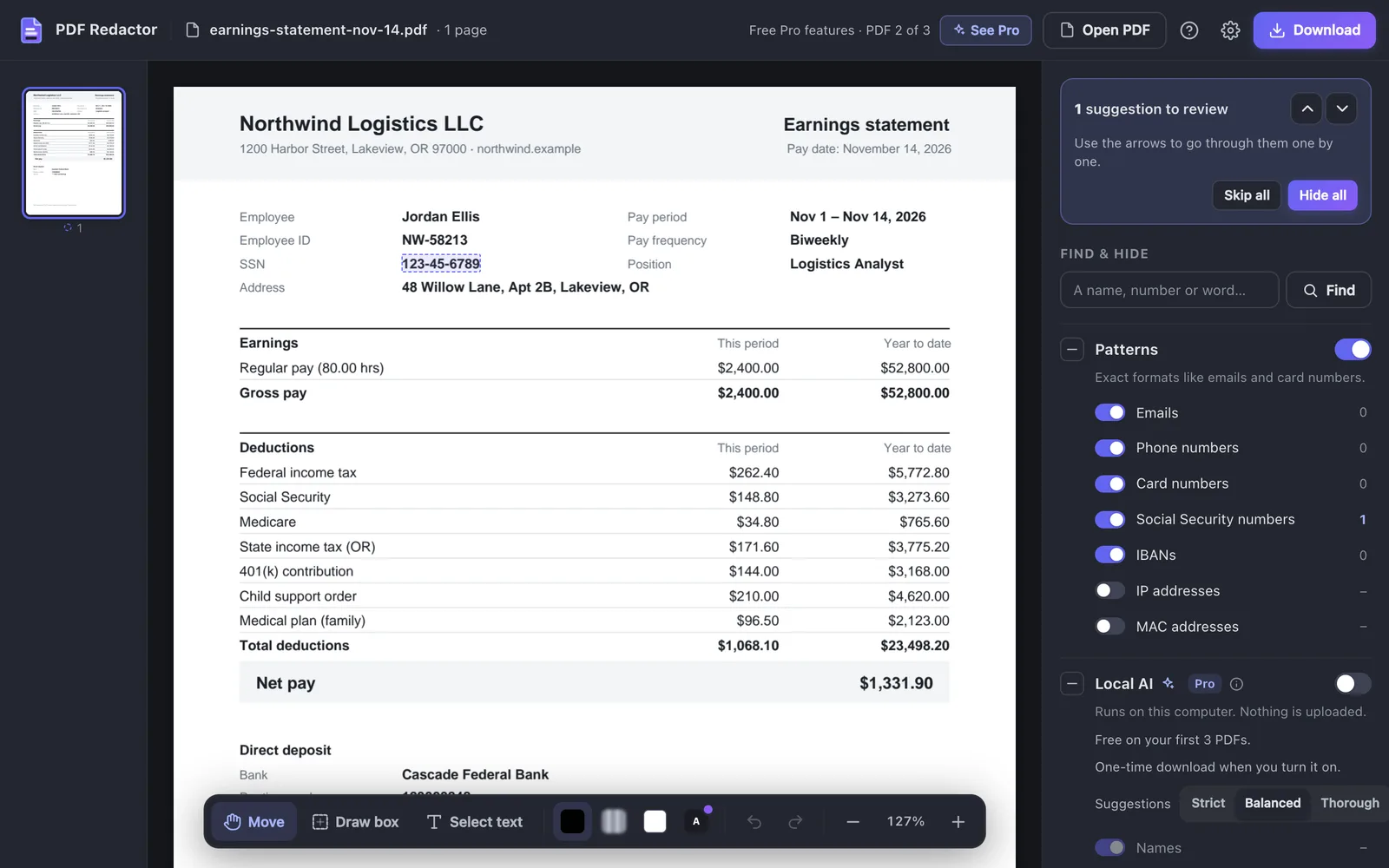
- Open the PDF. Click the extension icon and drop in your stub. If your SSN is
printed in full with dashes or spaces (
123-45-6789), it’s outlined as a suggestion straight away, along with any phone numbers and email addresses. Press H or click a suggestion to hide it, or Hide all to hide them all at once.
- Cover a partial SSN. For a masked number like
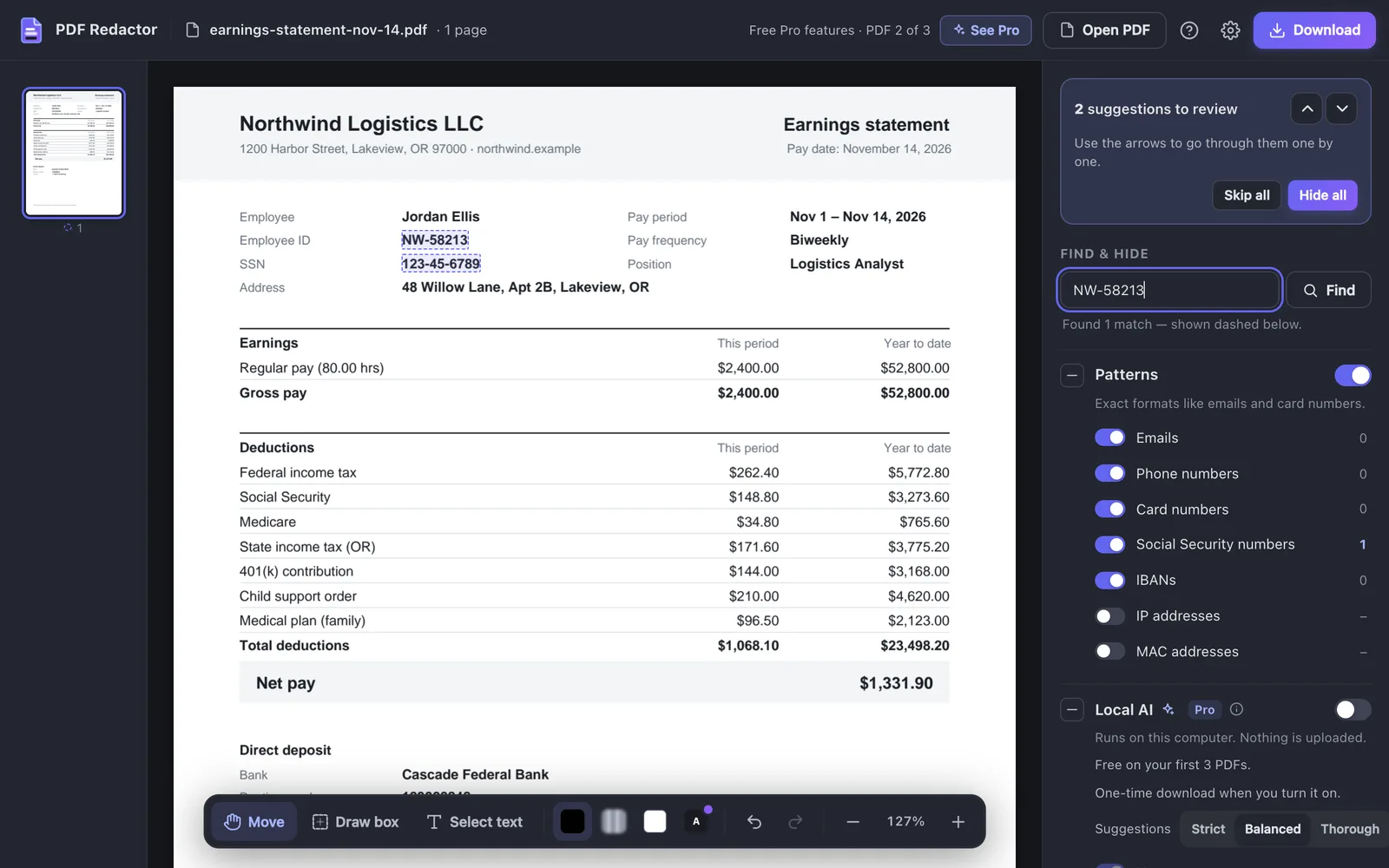
XXX-XX-6789, use Select text to select it, or Draw box over it. (Searching for just the last four digits would also catch any other number containing them.) - Find your employee ID. Type it into the Find & hide box as it’s printed and click Find. Every copy is outlined; hide them with Hide all.
- Remove the bank details and personal deductions. If the deposit information is in one block, Draw box over the block is quickest. Do the same for each deduction line you’re hiding, and leave the totals visible.
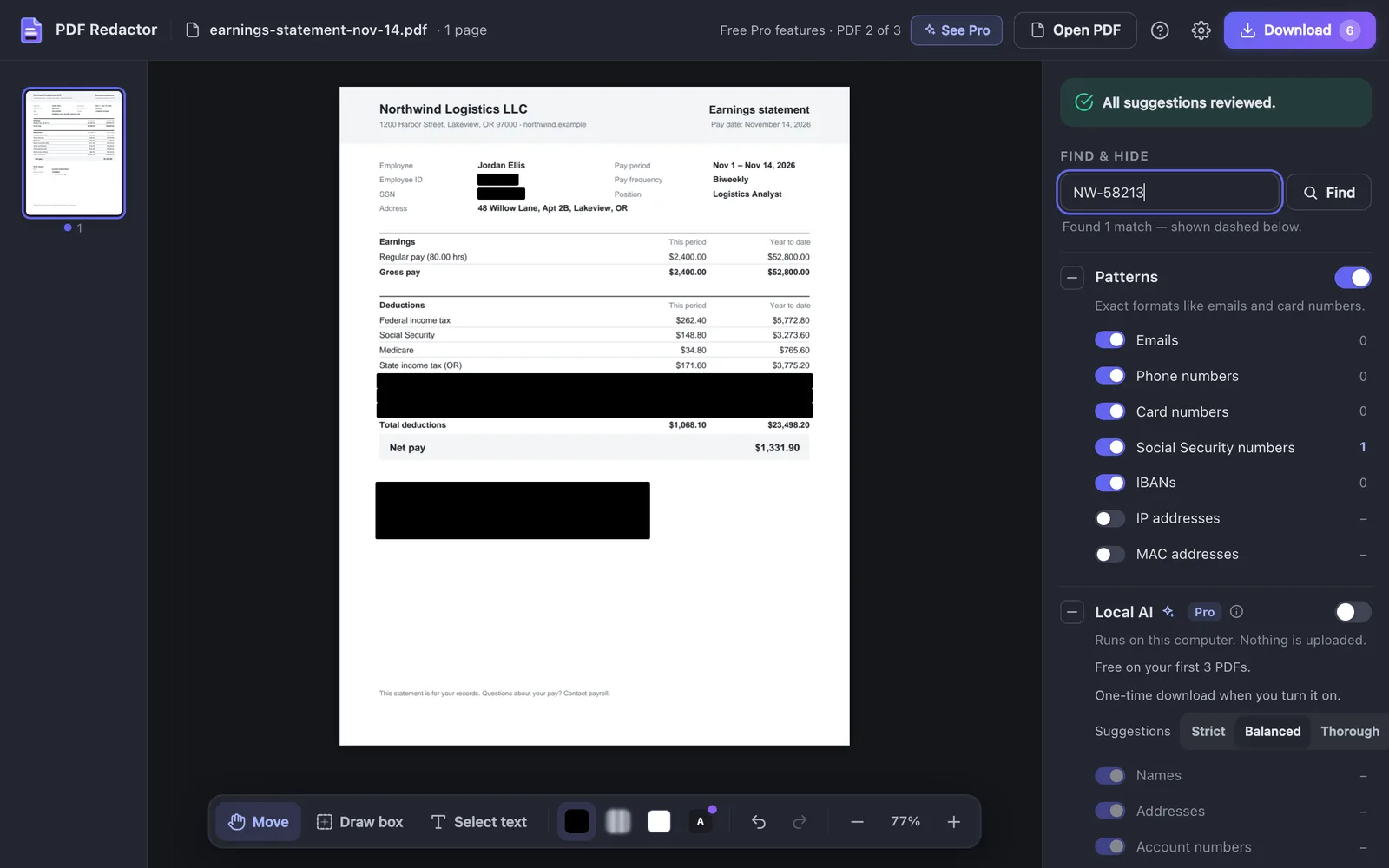
- Download. Remove hidden info is on by default and strips the author, comments, attachments and earlier versions from the copy. PDF Redactor then reopens the new file and searches it for every word you removed. If anything can still be found, it tells you.
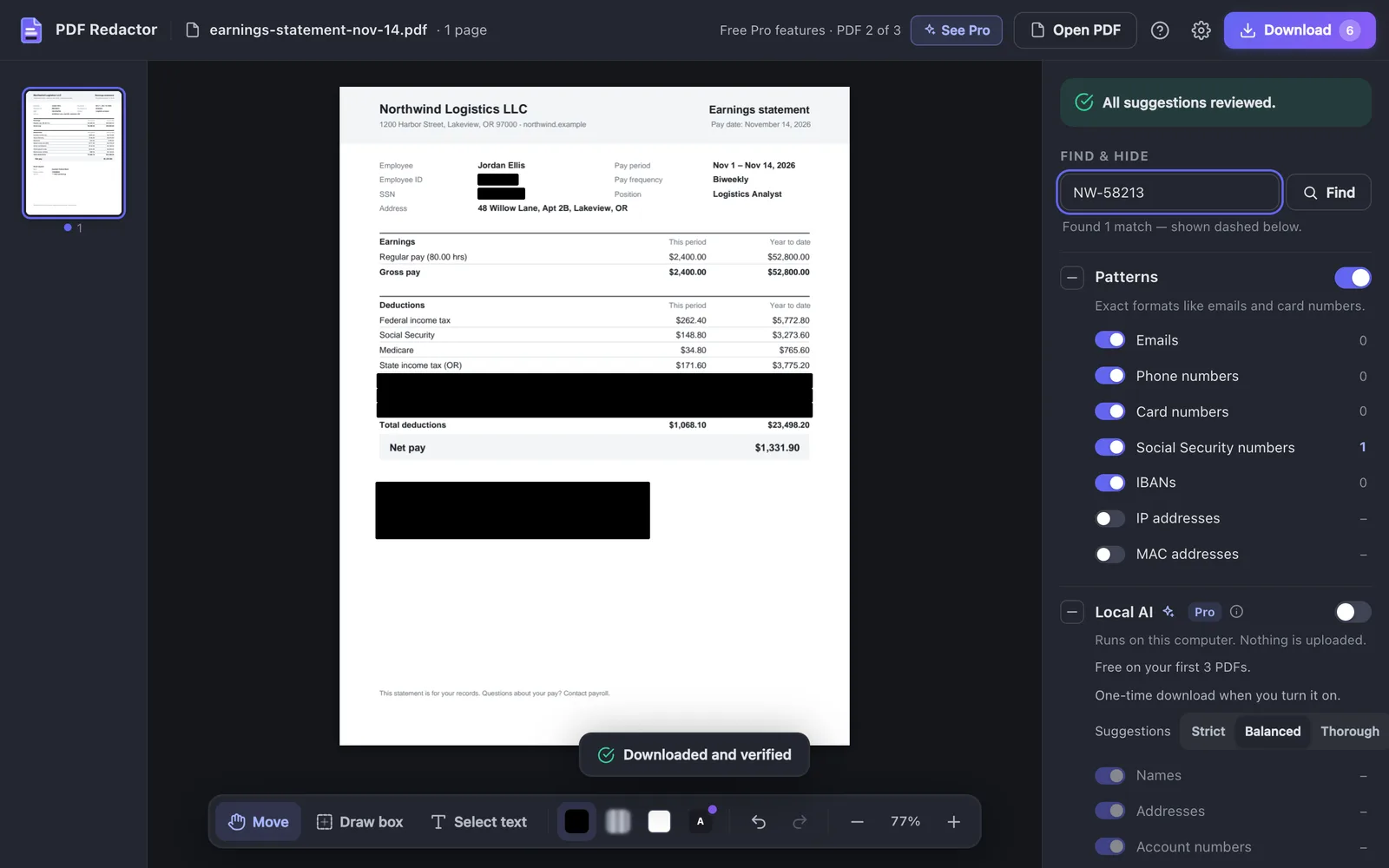
Your original file isn’t changed.
If you only have a paper stub, scan it or take a photo and save it as a PDF. Draw box works on scans too, because the area is painted out of the page image. With Pro, Scanned text reads the printed text on the scan so suggestions and Find words work there as well, and Local AI finds names, addresses and account numbers on its own. Both are free on your first 3 PDFs. Give scanned pages a quick look before you send them.
One last check
Open the copy you downloaded, press ⌘F or Ctrl+F, and search for your SSN, its last four digits and your account number. No matches means no one else will find them either.
In Canada? Pay stubs, SINs and the rules for landlords are different there; see redacting a Canadian pay stub. And if the landlord also wants a bank statement, the same steps apply to that.
This post explains general practice and isn’t legal advice. What a landlord or lender may ask for varies by state and city.
Sources
- California Labor Code § 226, via Justia
- What is proof of income? A complete guide for renters, RentCafe
- How to spot fake pay stubs, Apartments.com
Questions
Do landlords need my Social Security number from my pay stub?
No. The pay stub is there to show your income. If a landlord runs a credit check, that's a separate form you fill in and consent to.
Can I redact a pay stub for a mortgage application?
Lenders check income more closely and may reject heavily redacted documents. Hiding the SSN and account number is usually fine, but ask your loan officer before hiding anything else.
Is a redacted pay stub still valid proof of income?
Yes, as long as you only hide lines and don't change any figures. Editing numbers turns it into a fake document.