
Smart Blur

Smart Blur is a browser extension that protects your privacy during screen shares and in public settings by intelligently blurring sensitive parts of web pages. No accounts, no cloud, and 100% private — your data never leaves your machine.
Free on Chrome Web Store
100% local — data never leaves your device
No account required
Features
The "Smart" Difference
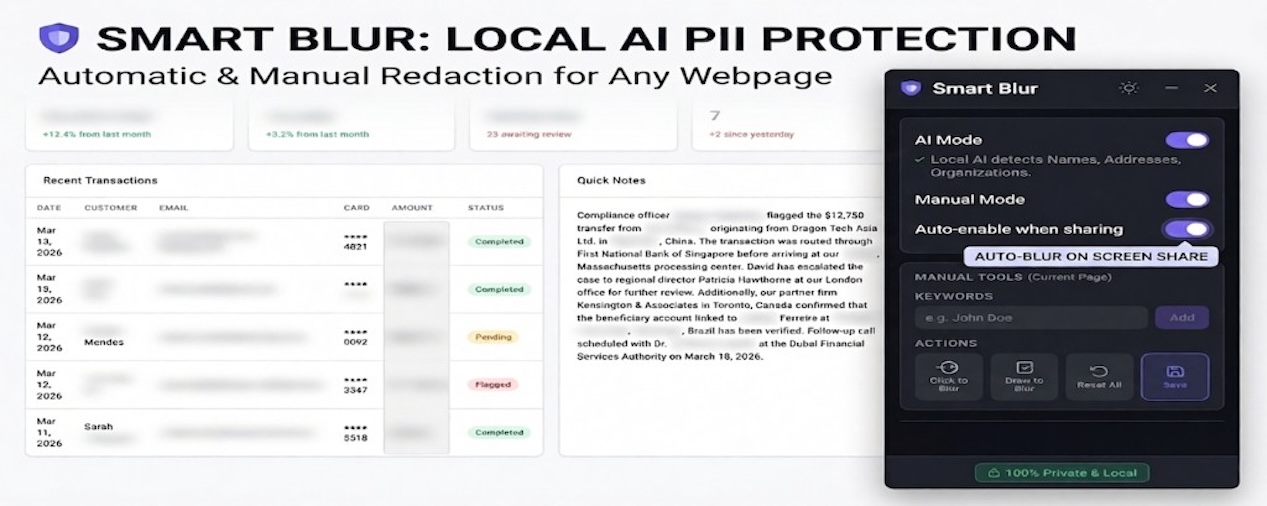
- Auto-Shield: Automatically activates when you share your screen in Google Meet, Zoom, or Teams. No more "forgot-to-blur" panic.
- On-Device AI: Identifies names, addresses, and organizations in plain text. Runs 100% locally via WebGPU — no data ever leaves your computer.
Precision Manual Tools
- One-Click Presets: Instantly redact Emails, SSNs, Credit Cards, and Phone Numbers.
- Manual Selection: Use Click-to-Blur for elements or Draw-to-Blur for custom regions and images.
- Smart Persistence: Your blur rules are saved per URL and reappear automatically when you revisit.
Privacy First
- Multi-Language AI: Support for English, German, Italian, and French.
- 100% Private: No accounts, no cloud, and zero tracking. Just install and protect.
Demo
See Smart Blur automatically redacting PII during a screen sharing session.
Comparison
How Smart Blur stacks up against other browser privacy tools.
| Feature | Smart Blur | Others |
|---|---|---|
| Keyword & pattern detection | ||
| HTML element selection (click-to-blur) | ||
| Free-form drawing (region blur) | ||
| Fully local & private (no account, no cloud) | Limited support | |
| Domain- or URL-specific rules | Limited support | |
| Per-page blur persistence Pro | Limited support | |
| Local AI mode (unstructured PII) Pro Only Smart Blur | ||
| Screen-share auto-detection Pro Only Smart Blur | ||
| Import / export settings Pro Only Smart Blur |
Limited support = some extensions offer this; others do not or support it inconsistently.
Frequently asked questions
Quick answers about Smart Blur.
What is Smart Blur?
Smart Blur is a productivity and privacy browser extension that lets you blur parts of web pages so passwords, messages, or personal data stay hidden during screen shares or when someone glances at your screen.
Is Smart Blur free?
Yes — most of the features of Smart Blur is free. For pro features, there is a one-time purchase. You pay once and keep using the Pro features without any recurring fees
Where does my data go?
Nowhere. Smart Blur processes everything locally in your browser using WebGPU. No data is sent to any server. See the privacy policy linked on this page for full details.
Which screen sharing apps does Smart Blur support?
Smart Blur automatically activates when you share your screen from browser. It has been tested with Google Meet, Zoom Web, or Microsoft Teams. More platforms may be supported. Due to browser restriction, it doesn't work if the screen is shared with an app.
Does the AI mode work offline?
Yes. The on-device AI runs entirely via WebGPU in your browser with no internet connection required after the initial model download.
Ready to protect your screen?
Install Smart Blur in seconds. Free, local, no account needed.